> For the complete documentation index, see [llms.txt](https://docs.wemix.fi/llms.txt). Markdown versions of documentation pages are available by appending `.md` to page URLs; this page is available as [Markdown](https://docs.wemix.fi/guides/pool/deposit.md).

# Deposit

The Deposit feature enables depositing tokens to liquidity pools on WEMIX.Fi. This guide walks through the complete process of creating a liquidity position.

{% hint style="info" %}

#### Prerequisites

**Required items for Deposit:**

* Web3 wallet (WemixPLAY, MetaMask) set up for WEMIX3.0 network
* Token pairs to deposit
* Native WEMIX to pay network transaction fees

**WEMIX.Fi Pool offers two approaches for depositing liquidity:**

* **Preset Options**: Simplified deposit process using predefined range configurations
* **Manual Configuration**: Advanced setup allowing precise control over deposit range parameters

Users can choose either method based on their understanding of concentrated liquidity mechanics.
{% endhint %}

***

{% stepper %}
{% step %}

## Selecting a Pool

<figure><img src="https://1713088198-files.gitbook.io/~/files/v0/b/gitbook-x-prod.appspot.com/o/spaces%2FEo55jrwSeX46HoVs0pqI%2Fuploads%2FFZAKXYhc3A9nKIgYFfwm%2Fimage.png?alt=media&amp;token=d71e3614-c568-4fb5-9612-a0420b30dabb" alt=""><figcaption></figcaption></figure>

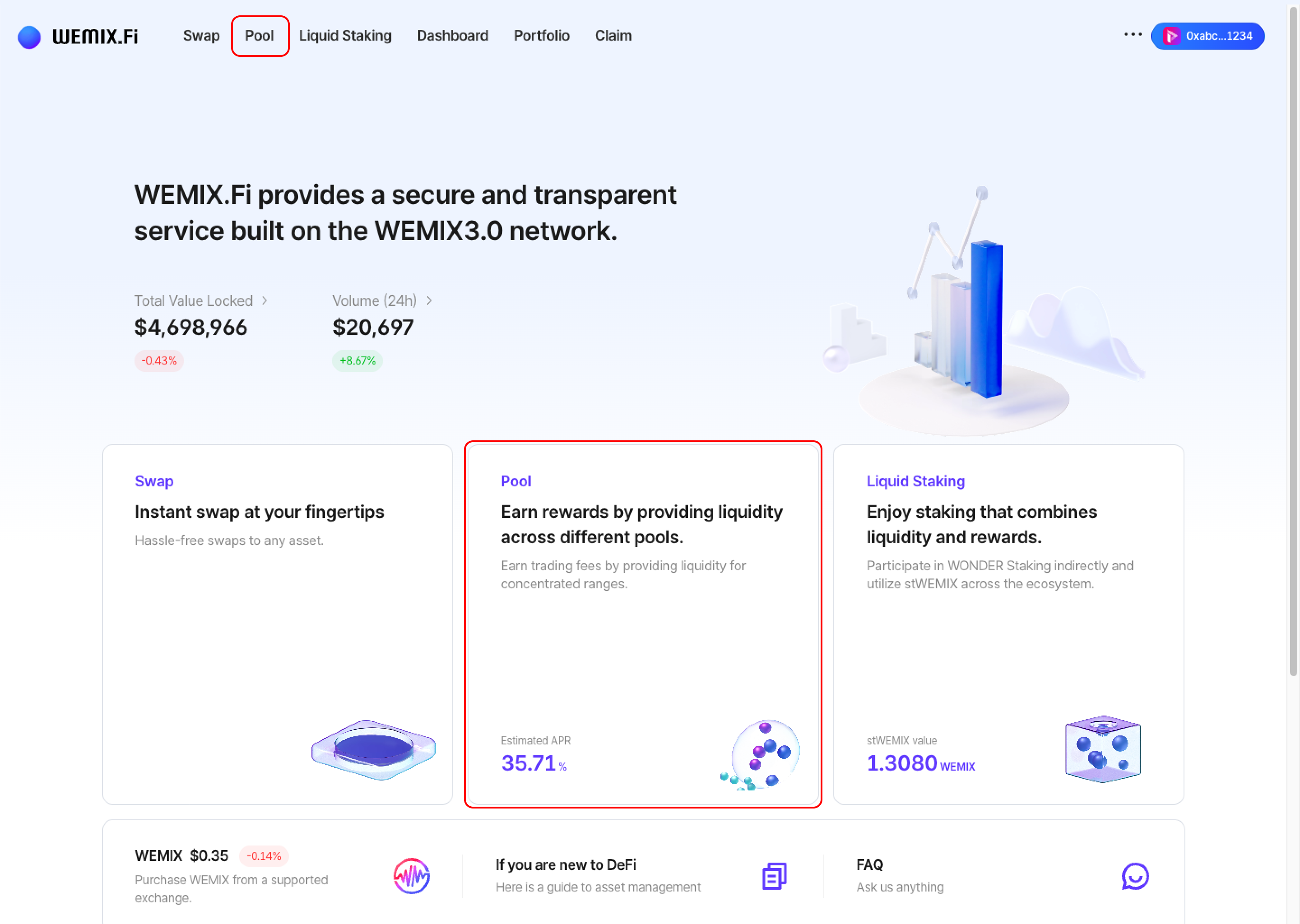
* Connect a wallet to WEMIX.Fi and navigate to the Pool page.

<figure><img src="https://1713088198-files.gitbook.io/~/files/v0/b/gitbook-x-prod.appspot.com/o/spaces%2FEo55jrwSeX46HoVs0pqI%2Fuploads%2FnvMeuuqvNpZva3gxNTsn%2Fimage.png?alt=media&amp;token=1082fb8c-390d-4997-ae65-d2cefc9f0789" alt=""><figcaption></figcaption></figure>

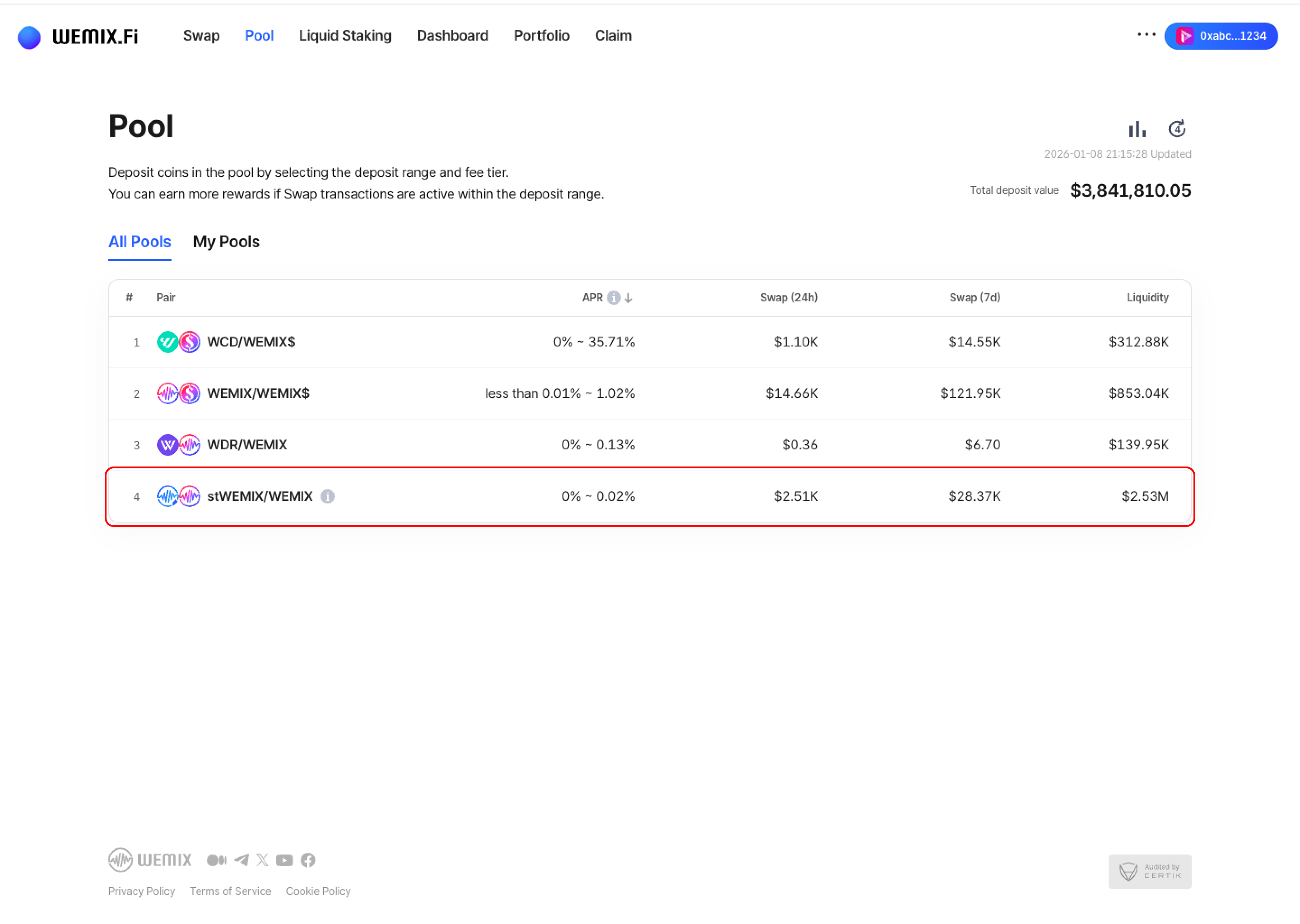
* Browse available pools and select one based on liquidity depth, trading volume, and APR.
  {% endstep %}

{% step %}

## Select Range Size

<figure><img src="https://1713088198-files.gitbook.io/~/files/v0/b/gitbook-x-prod.appspot.com/o/spaces%2FEo55jrwSeX46HoVs0pqI%2Fuploads%2Fin829CdzoBDJ1WkNRNGR%2Fimage.png?alt=media&amp;token=f749e650-77b3-40ca-b472-739c46d1a3e3" alt=""><figcaption></figcaption></figure>

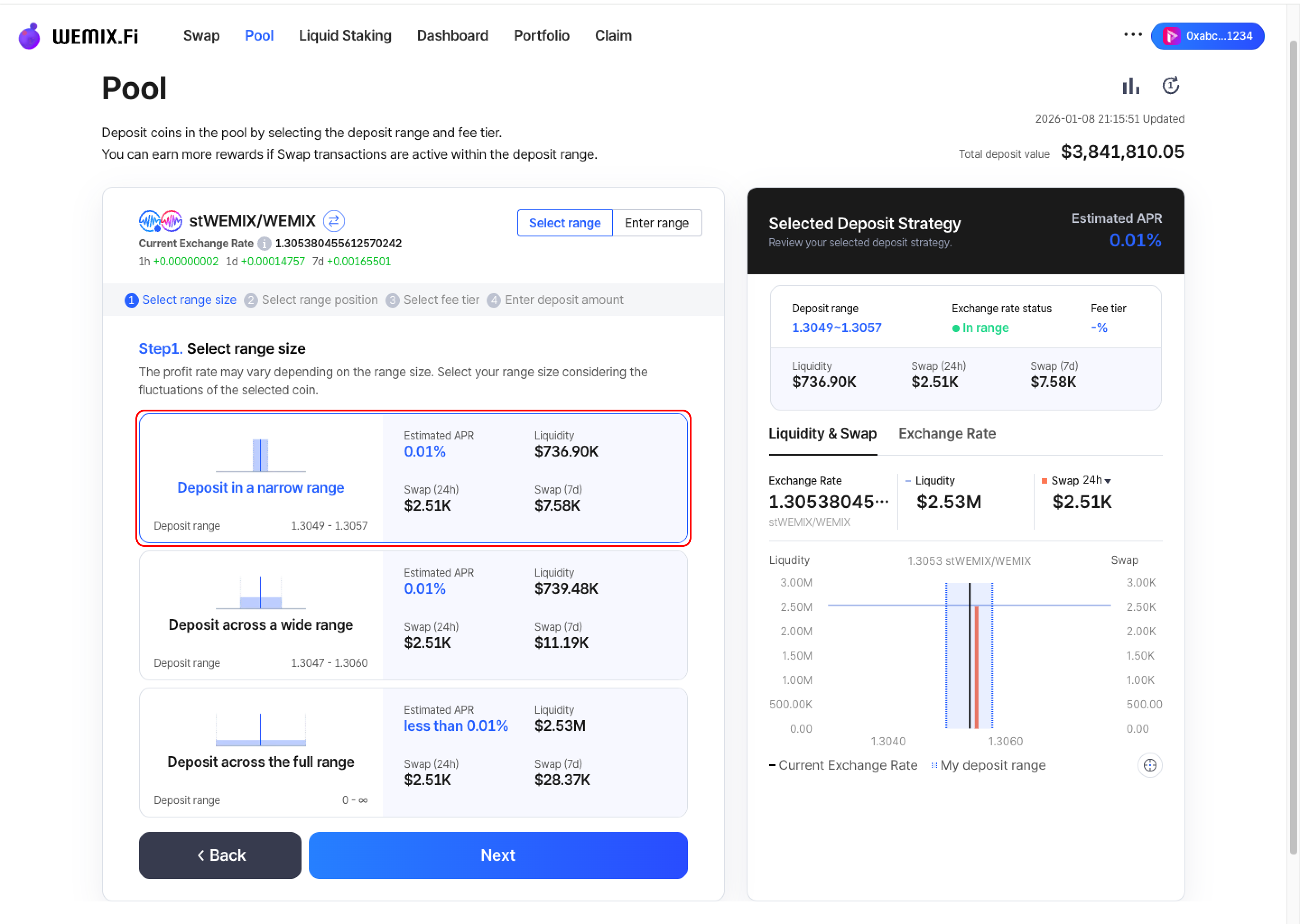
* Choose the size of the deposit range. The reward rate varies depending on range size. Consider the volatility characteristics of the selected token pair when choosing range size.
  {% endstep %}

{% step %}

## Select Range Position

<figure><img src="https://1713088198-files.gitbook.io/~/files/v0/b/gitbook-x-prod.appspot.com/o/spaces%2FEo55jrwSeX46HoVs0pqI%2Fuploads%2Fj4aAB8Mf2t8XoMtgGu5x%2Fimage.png?alt=media&amp;token=d963dd39-ccc8-4515-b8c5-a9ff4f32eec1" alt=""><figcaption></figcaption></figure>

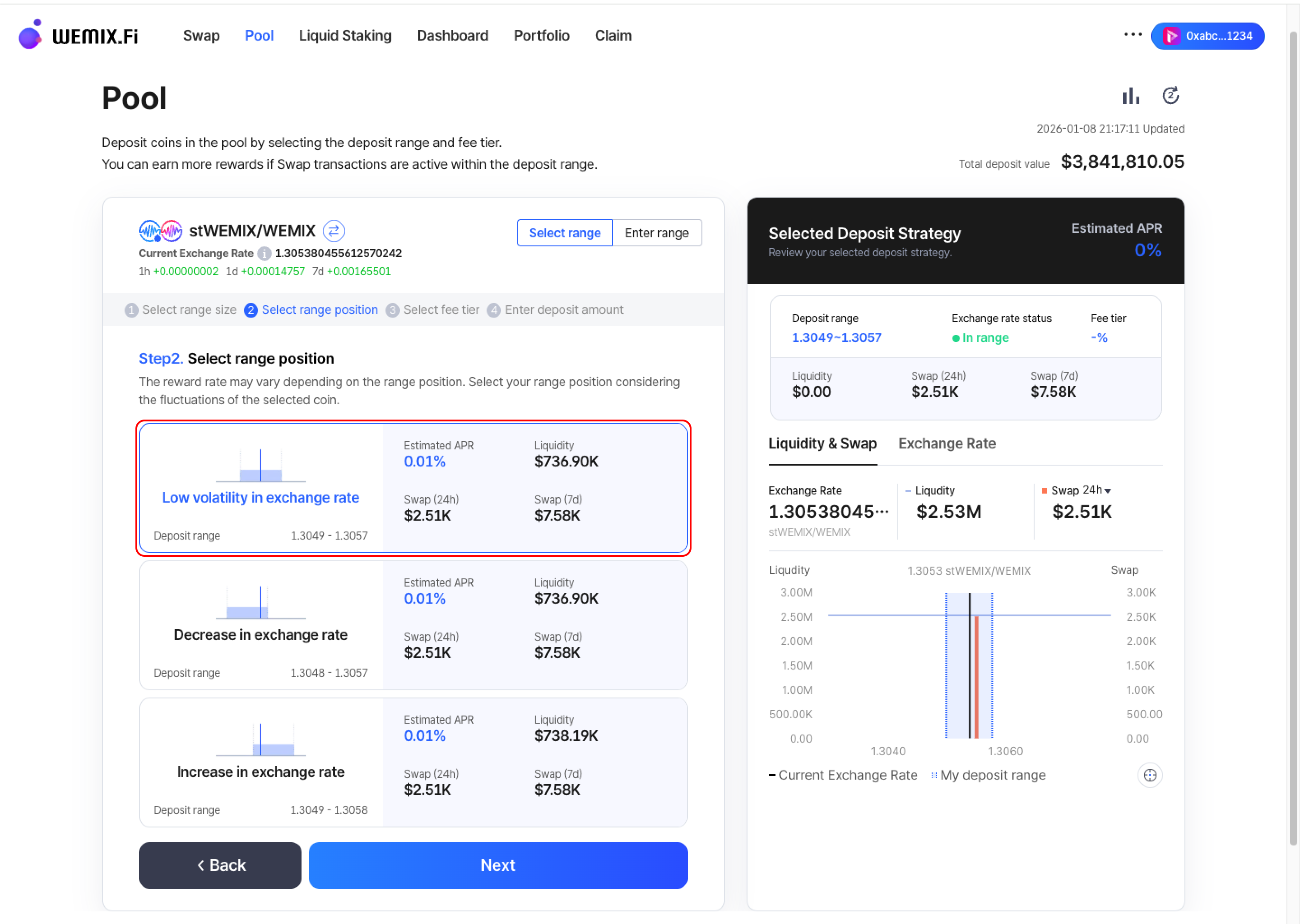
* Choose where to position the deposit range. The reward rate varies depending on range position. Select the position based on anticipated exchange rate movement of the token pair.
  {% endstep %}

{% step %}

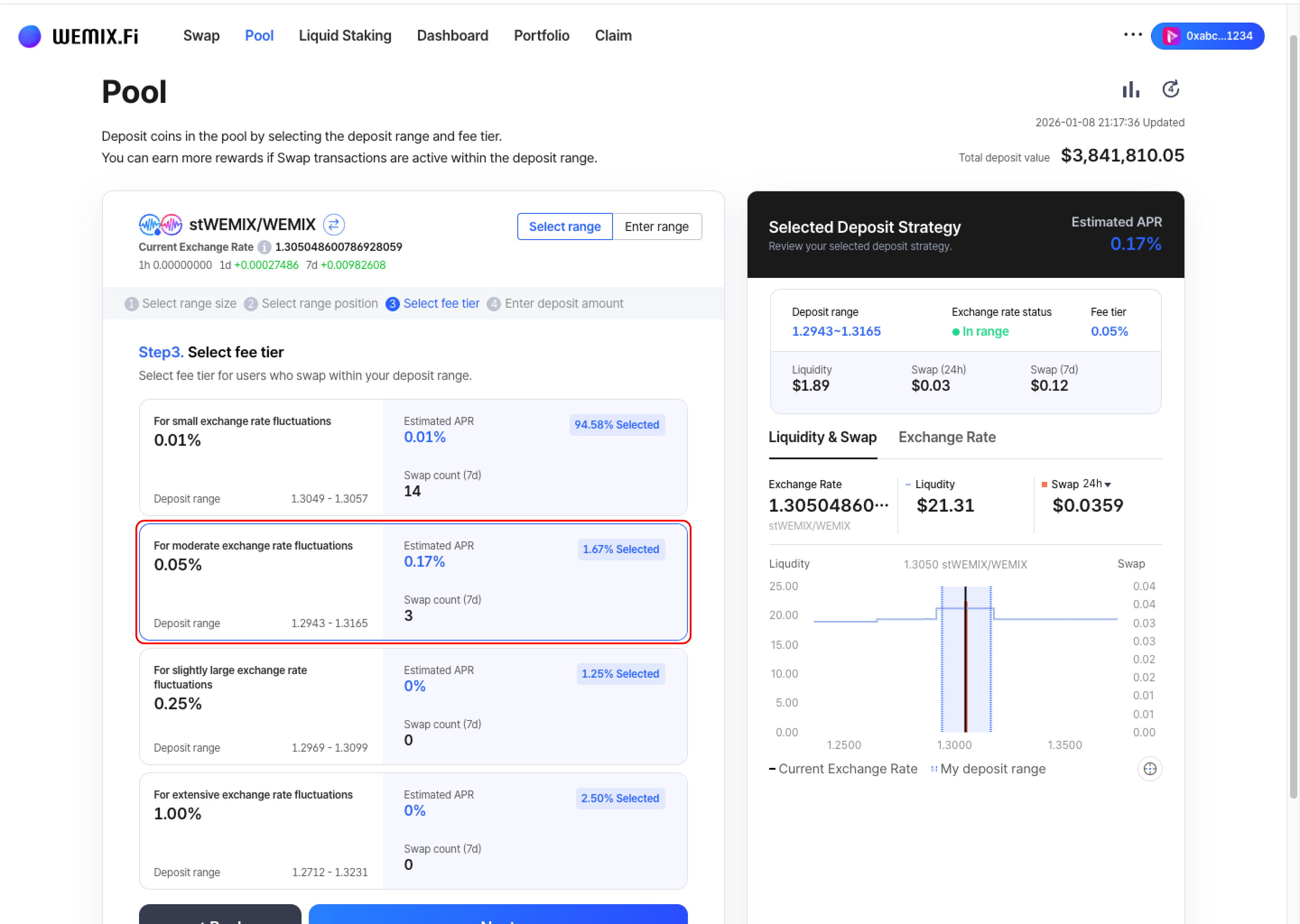
## Select Fee Tier

<figure><img src="https://1713088198-files.gitbook.io/~/files/v0/b/gitbook-x-prod.appspot.com/o/spaces%2FEo55jrwSeX46HoVs0pqI%2Fuploads%2Fu7arvSSfUWkYBY2v8zcb%2Fimage.png?alt=media&amp;token=722c2e48-9d53-4fa6-b2e7-4f102fef8a51" alt=""><figcaption></figcaption></figure>

* Choose the fee tier to receive from users who swap within the deposit range.
  {% endstep %}

{% step %}

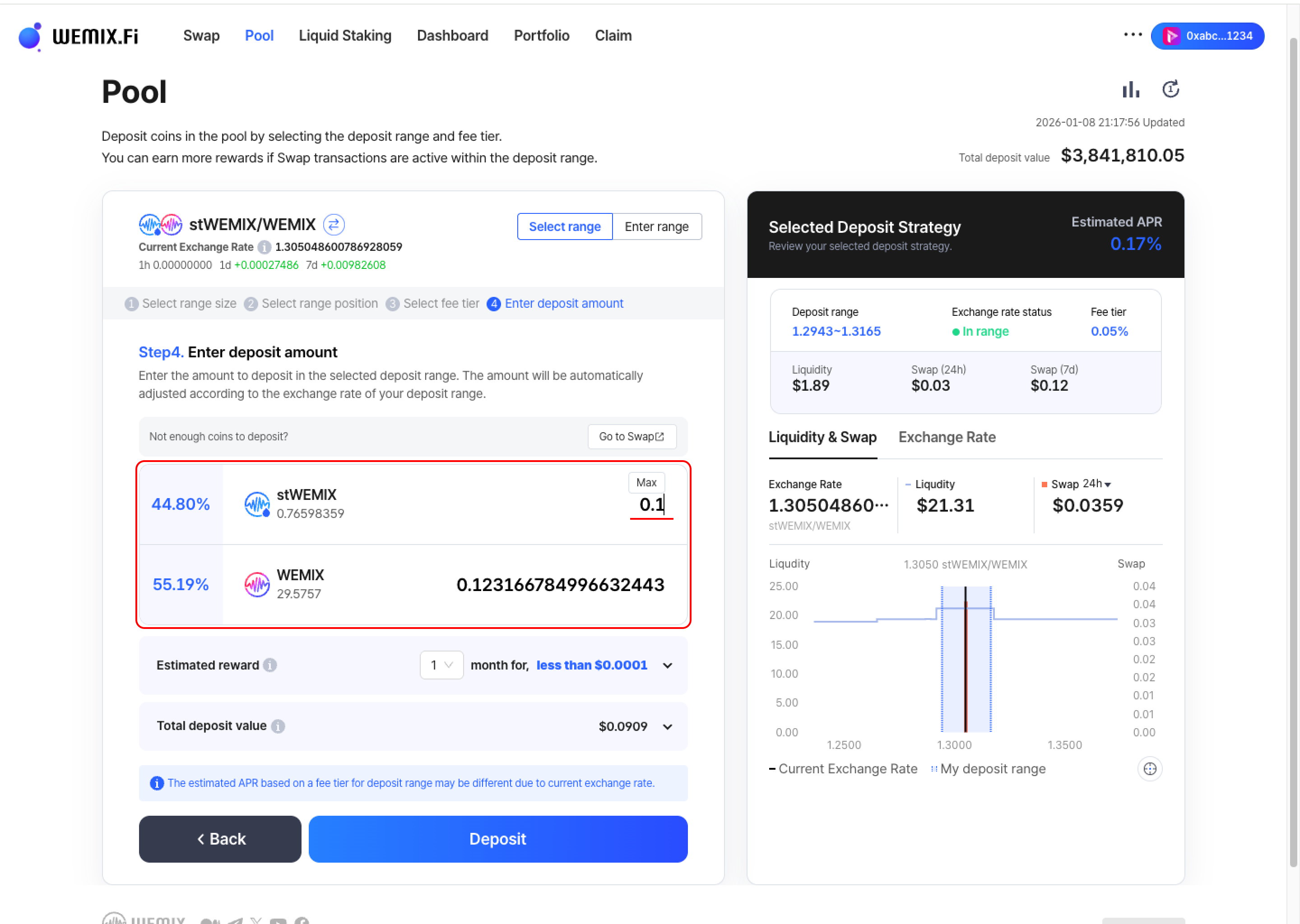
## Enter Deposit Amount

<figure><img src="https://1713088198-files.gitbook.io/~/files/v0/b/gitbook-x-prod.appspot.com/o/spaces%2FEo55jrwSeX46HoVs0pqI%2Fuploads%2FYj0R6F4ijGfCXV3Y7O9o%2Fimage.png?alt=media&amp;token=0463978f-5009-46cb-9408-d0c876623e43" alt=""><figcaption></figcaption></figure>

* Input the amount to deposit in the selected range. The amount will be automatically adjusted according to the exchange rate of the deposit range.

<figure><img src="https://1713088198-files.gitbook.io/~/files/v0/b/gitbook-x-prod.appspot.com/o/spaces%2FEo55jrwSeX46HoVs0pqI%2Fuploads%2FXGFyTuU05htsLdepKjZm%2Fimage.png?alt=media&amp;token=d9b99301-b270-483a-808a-b99e008e6596" alt=""><figcaption></figcaption></figure>

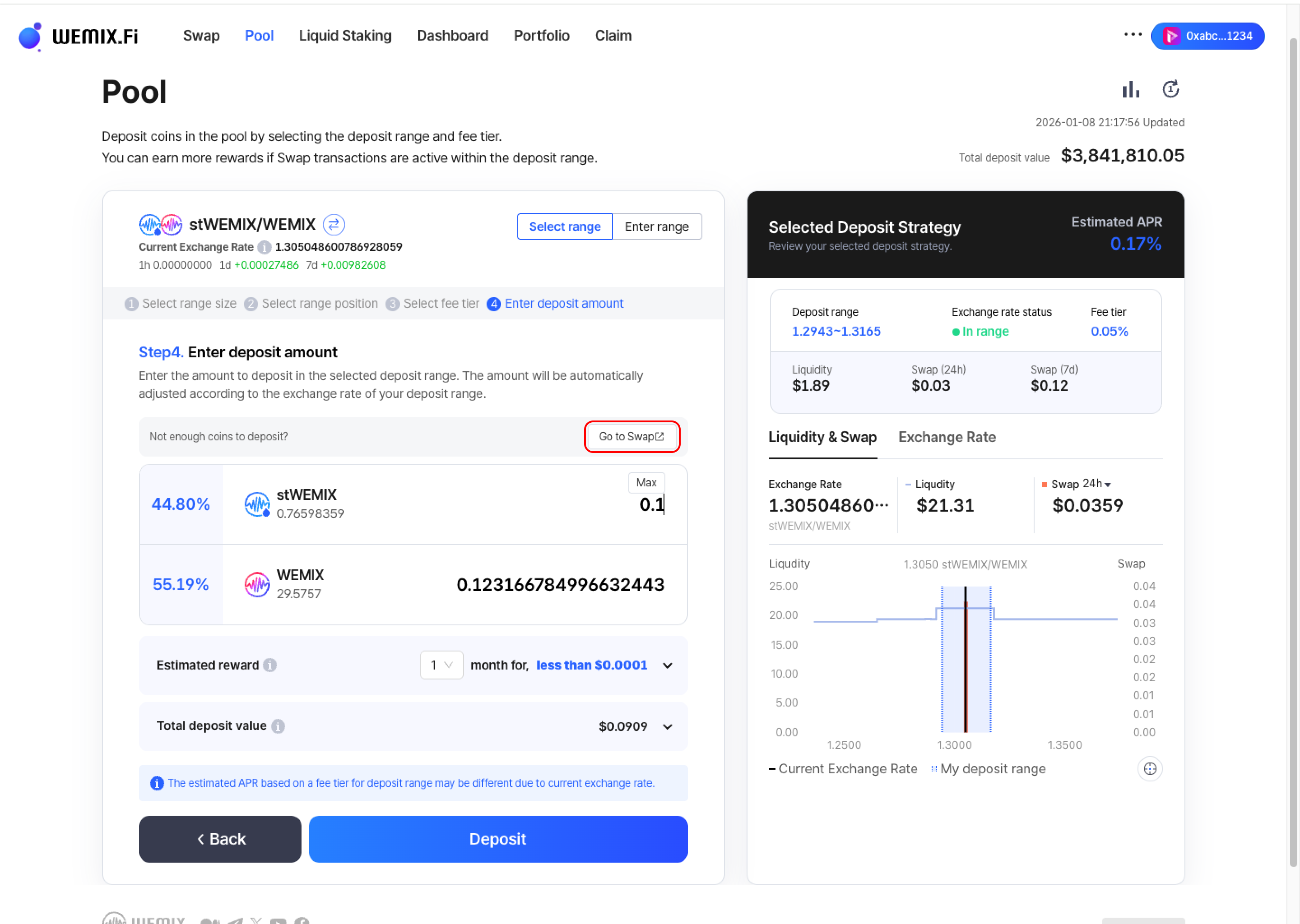
* If wallet balances are insufficient, additional tokens can be acquired through the Swap feature. The interface displays estimated rewards and total deposit value.
  {% endstep %}

{% step %}

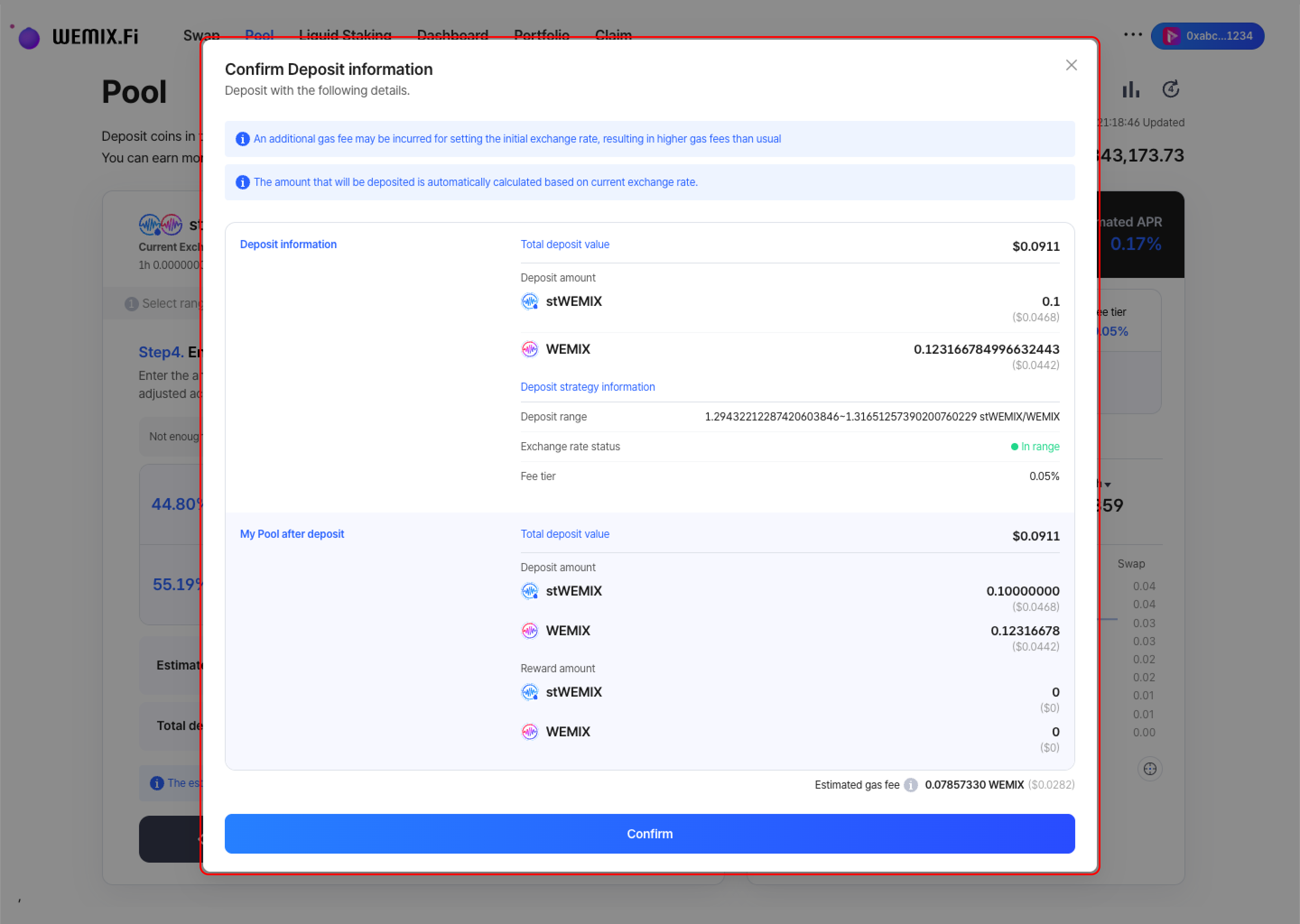
## Executing the Transaction

<figure><img src="https://1713088198-files.gitbook.io/~/files/v0/b/gitbook-x-prod.appspot.com/o/spaces%2FEo55jrwSeX46HoVs0pqI%2Fuploads%2FHMR3sRZoaKi5S2fxm7gj%2Fimage.png?alt=media&amp;token=3a0ca020-511f-4146-84e6-2b194e289943" alt=""><figcaption></figcaption></figure>

* Review all position parameters and confirm.

<figure><img src="https://1713088198-files.gitbook.io/~/files/v0/b/gitbook-x-prod.appspot.com/o/spaces%2FEo55jrwSeX46HoVs0pqI%2Fuploads%2FIKIo8qHZlPSYANHXsC7w%2Fimage.png?alt=media&amp;token=c64a013a-6fd8-45b6-aaa4-ae26a1051f4a" alt=""><figcaption></figcaption></figure>

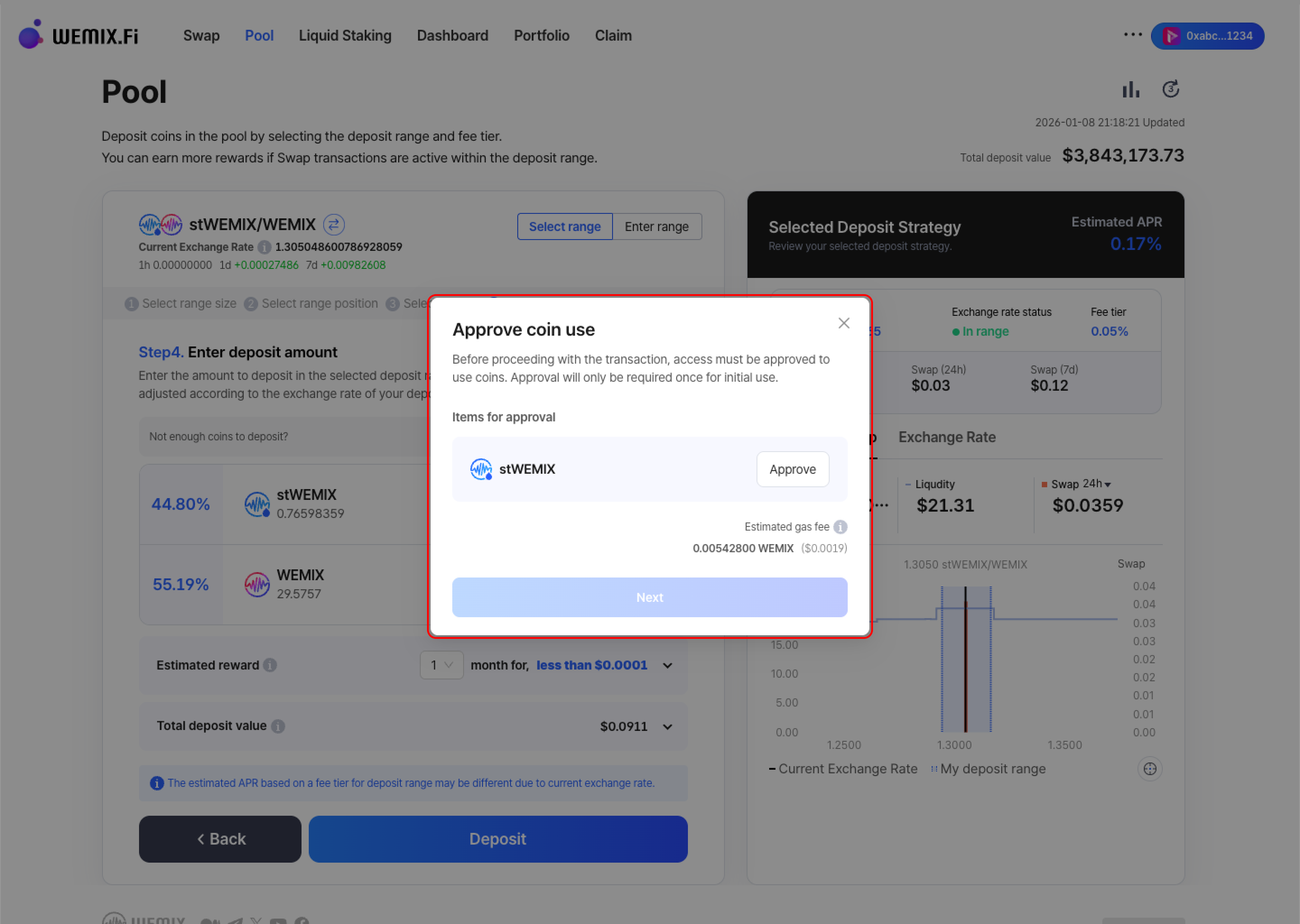
* The wallet requests approval - first-time deposits for specific tokens require additional contract approval.

<figure><img src="https://1713088198-files.gitbook.io/~/files/v0/b/gitbook-x-prod.appspot.com/o/spaces%2FEo55jrwSeX46HoVs0pqI%2Fuploads%2FIhKCIkIX8BmQlxMVzMGE%2Fimage.png?alt=media&amp;token=af0a9dad-e6a2-4347-8a03-3d9222d41f15" alt=""><figcaption></figcaption></figure>

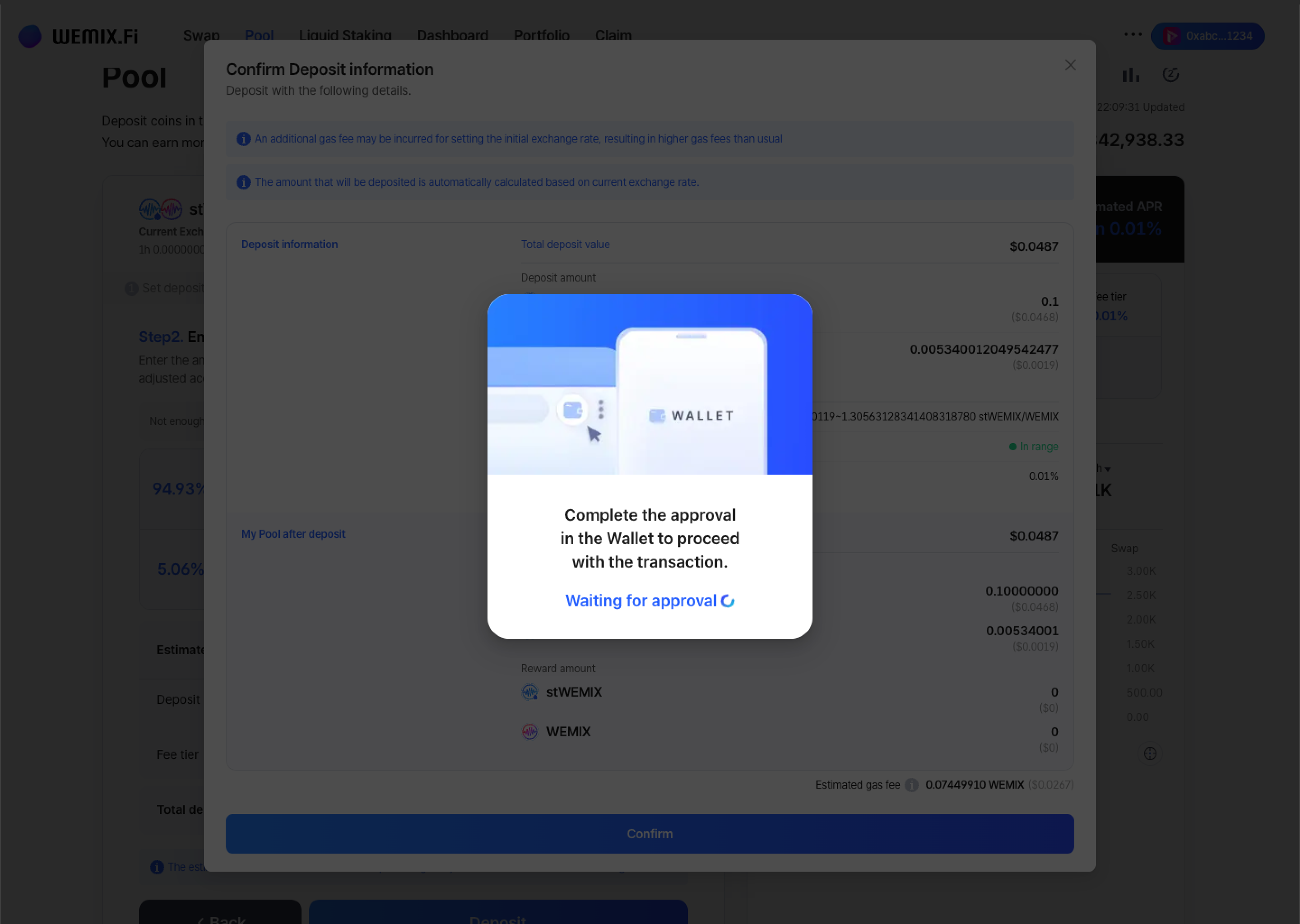
* After approval, the transaction processes on the blockchain.

<figure><img src="https://1713088198-files.gitbook.io/~/files/v0/b/gitbook-x-prod.appspot.com/o/spaces%2FEo55jrwSeX46HoVs0pqI%2Fuploads%2FOpMhPNmFOKLf809PH0IE%2Fimage.png?alt=media&amp;token=600a4cf4-2a74-42d0-967e-cdfc971065aa" alt=""><figcaption></figcaption></figure>

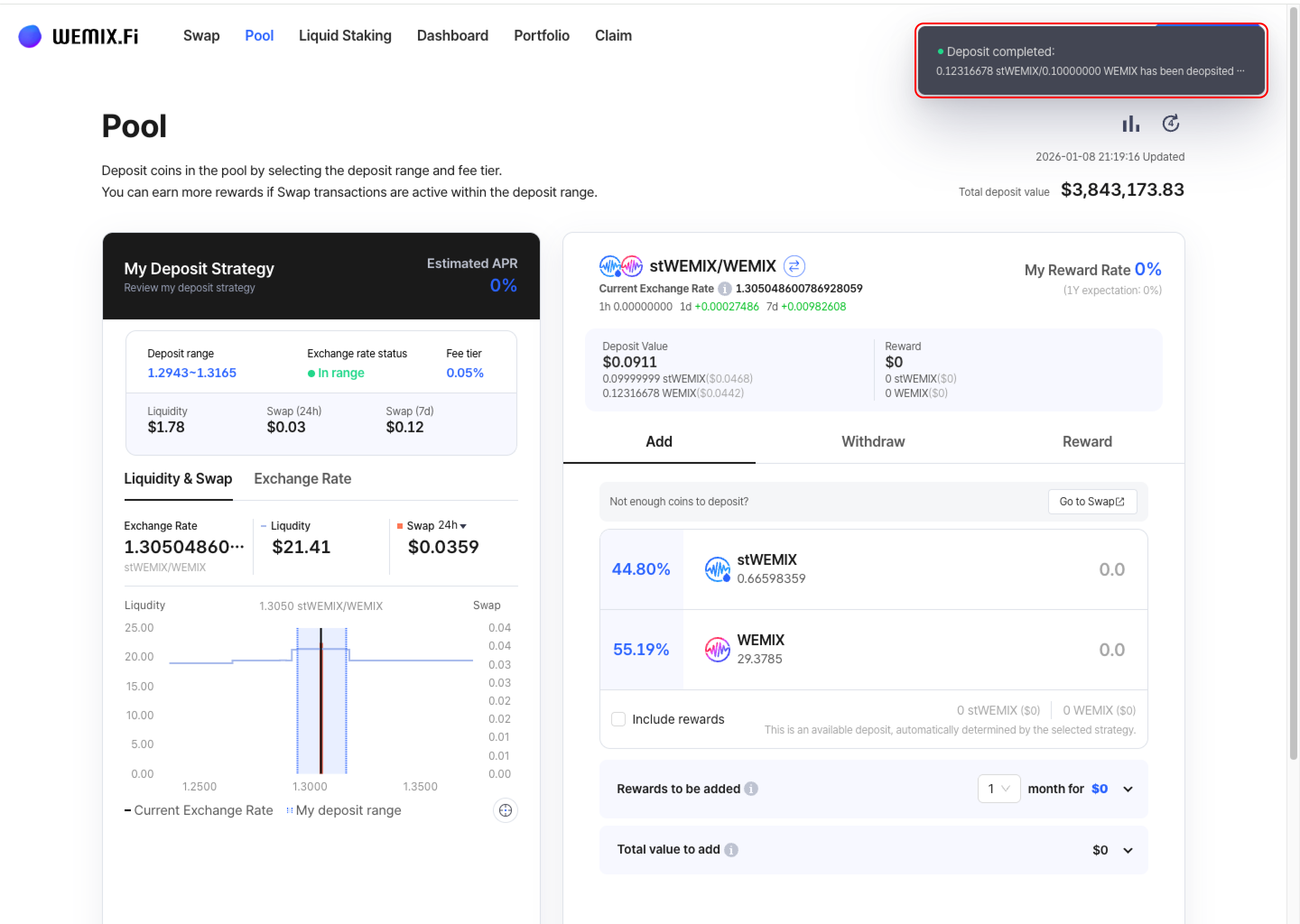
* A confirmation notification appears upon successful deposit creation.
  {% endstep %}
  {% endstepper %}

***

## Depositing with Manual Configuration

{% stepper %}
{% step %}

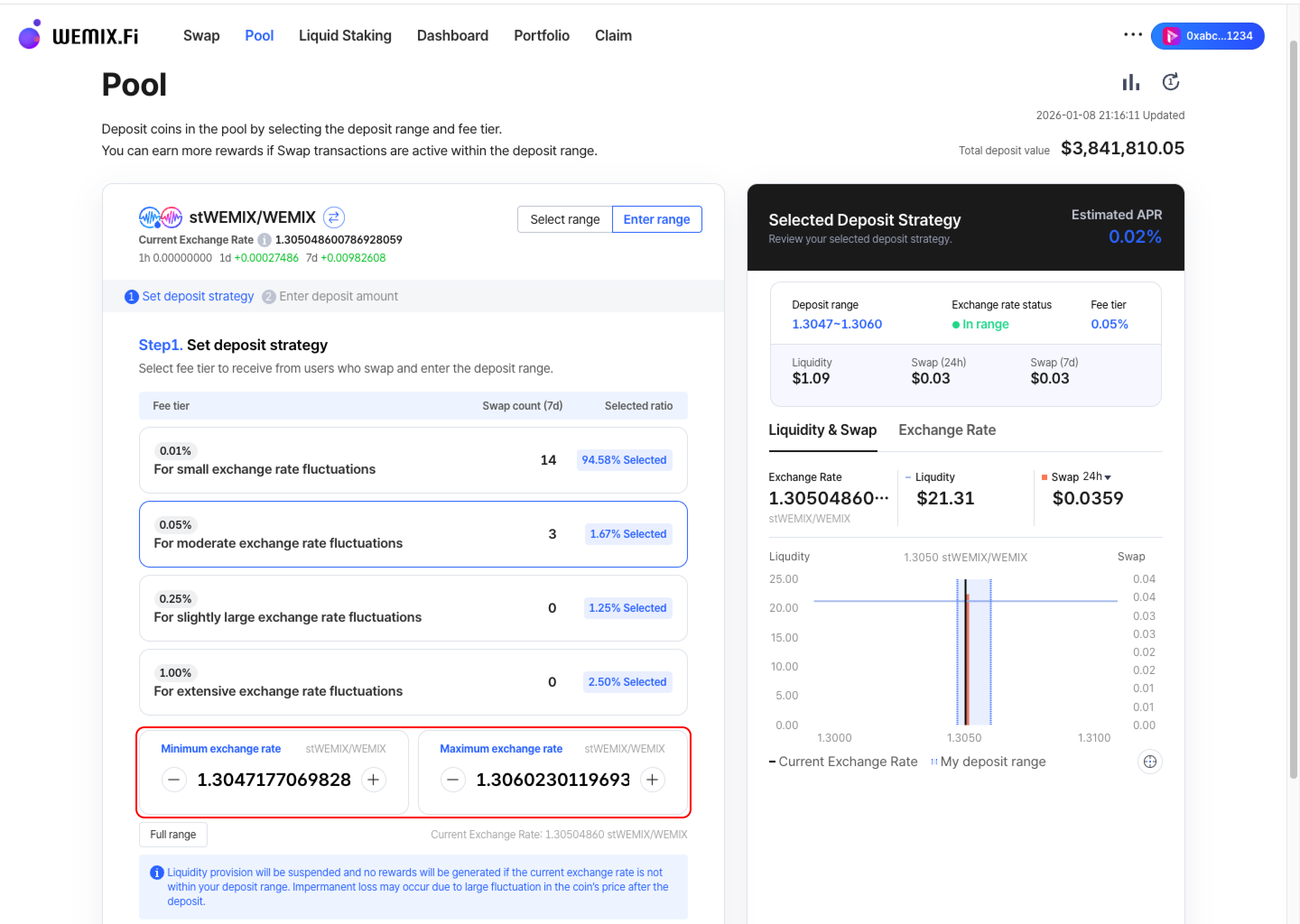
### Set Deposit Strategy

<figure><img src="https://1713088198-files.gitbook.io/~/files/v0/b/gitbook-x-prod.appspot.com/o/spaces%2FEo55jrwSeX46HoVs0pqI%2Fuploads%2Fn8dIcNUEBhZ5NsPlZ4C2%2Fimage.png?alt=media&amp;token=714b32c0-1797-4be7-ba64-f01fb20b7040" alt=""><figcaption></figcaption></figure>

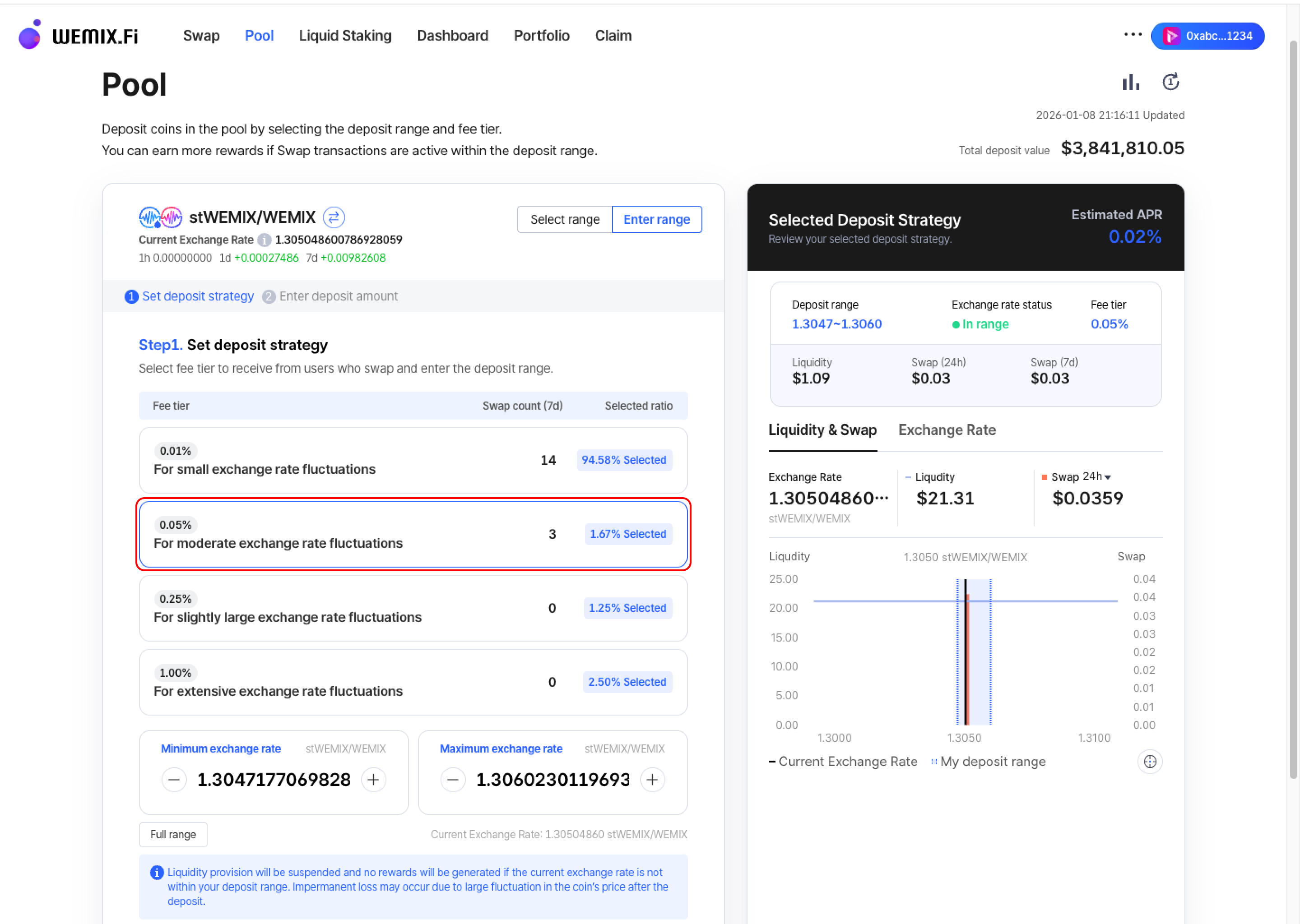
* Select the fee tier to receive from users who swap. Choose from 0.01%, 0.05%, 0.25%, or 1.00%.

<figure><img src="https://1713088198-files.gitbook.io/~/files/v0/b/gitbook-x-prod.appspot.com/o/spaces%2FEo55jrwSeX46HoVs0pqI%2Fuploads%2FNhOL5fpWUMePcYYl0Q4y%2Fimage.png?alt=media&amp;token=f3e0c265-1ad8-485f-bed5-65665db47b43" alt=""><figcaption></figcaption></figure>

* After selecting the fee tier, manually configure the deposit range by adjusting the minimum and maximum exchange rates.
  {% endstep %}

{% step %}

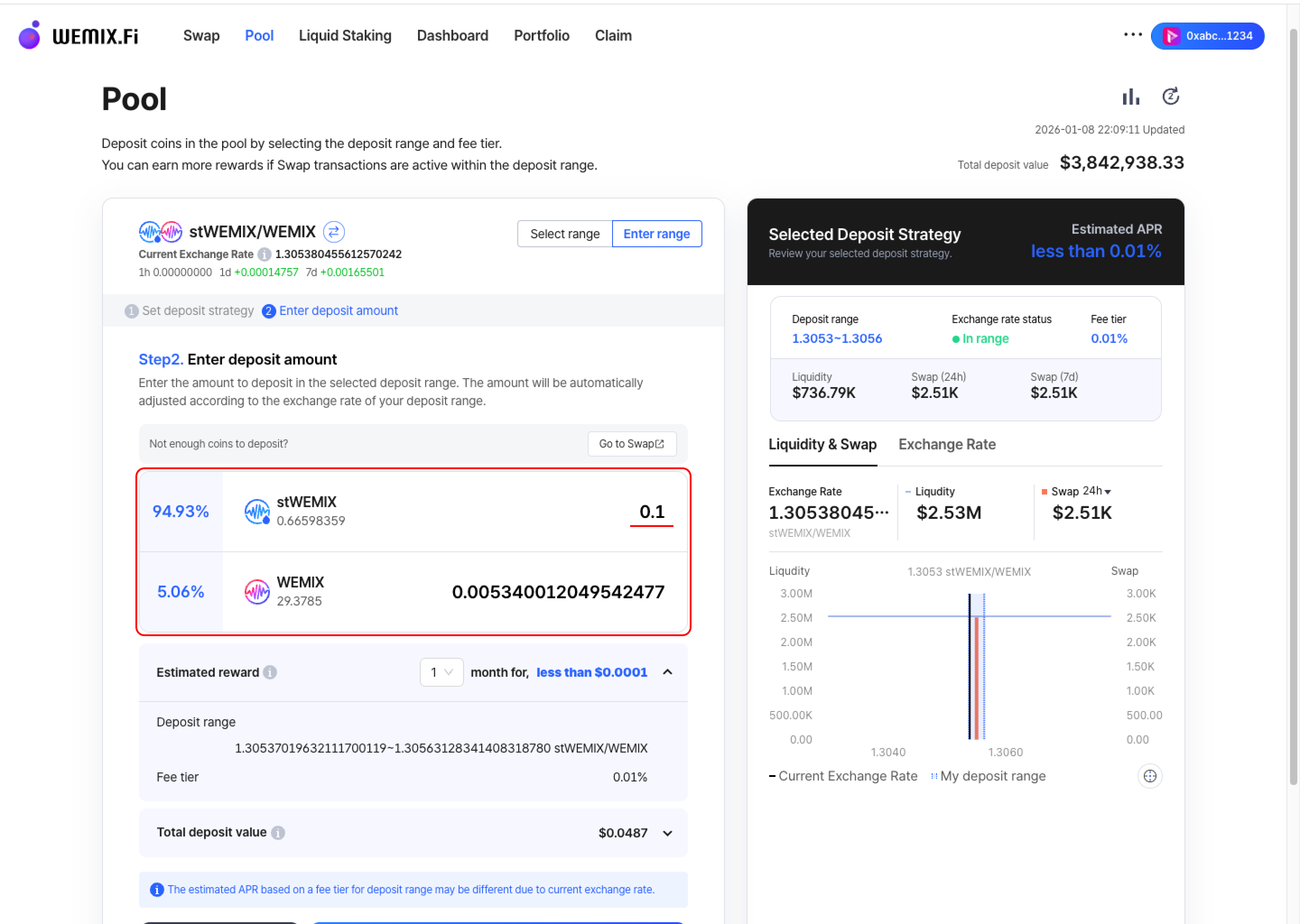
### Enter Deposit Amount

<figure><img src="https://1713088198-files.gitbook.io/~/files/v0/b/gitbook-x-prod.appspot.com/o/spaces%2FEo55jrwSeX46HoVs0pqI%2Fuploads%2FvsjqksDM3HbNtmsoZ2Sc%2Fimage.png?alt=media&amp;token=8a19d67e-0935-41b3-8548-d1733f8f300d" alt=""><figcaption></figcaption></figure>

* Input the amount to deposit in the configured range. The amount will be automatically adjusted according to the exchange rate of the deposit range.

{% hint style="info" %}
Follow the same execution and confirmation process as Preset Options
{% endhint %}
{% endstep %}
{% endstepper %}

***

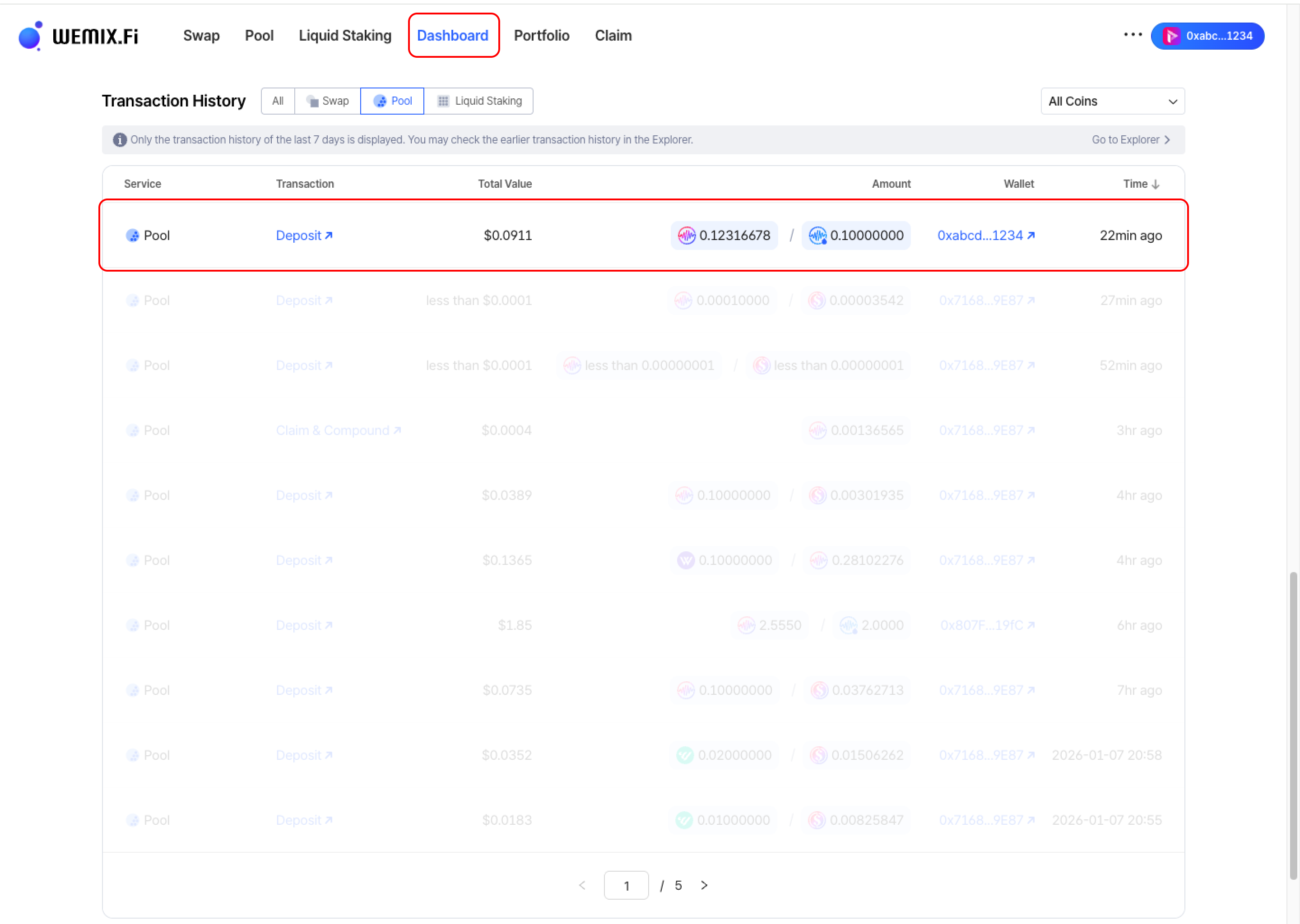
## Transaction History

<figure><img src="https://1713088198-files.gitbook.io/~/files/v0/b/gitbook-x-prod.appspot.com/o/spaces%2FEo55jrwSeX46HoVs0pqI%2Fuploads%2FzXiNFmPKIGokwrIa2hnb%2Fimage.png?alt=media&amp;token=bb7f7515-1d99-453c-b244-e561a212ba1f" alt=""><figcaption></figcaption></figure>

* Completed deposits appear in the Dashboard's Transaction History.

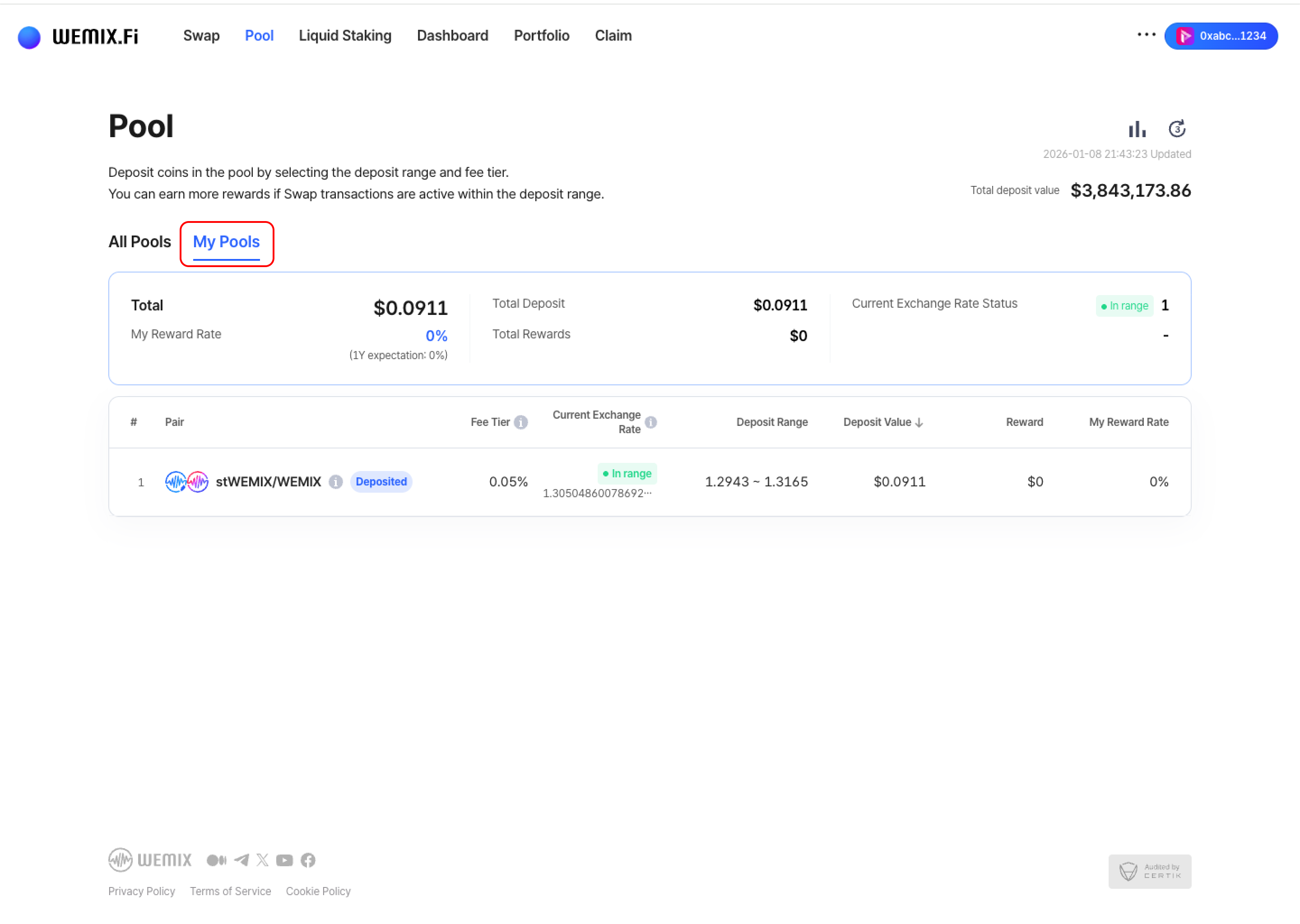
<figure><img src="https://1713088198-files.gitbook.io/~/files/v0/b/gitbook-x-prod.appspot.com/o/spaces%2FEo55jrwSeX46HoVs0pqI%2Fuploads%2Ftkoe7oY32YBdN2DeGfrA%2Fimage.png?alt=media&amp;token=f02cec71-cdce-48a4-8eb7-1b4e21a5f951" alt=""><figcaption></figcaption></figure>

* Active positions can be viewed and managed in the Pool page's 'My Pools' list.